The shell-pop Emacs package provides on-demand access to a terminal buffer via a single, configurable key binding. It allows toggling a terminal window without disrupting the workspace layout, making it a useful tool for quick command-line tasks.
NOTE: Kazuo Yagi, the shell-pop original author, appointed me as a co-maintainer of shell-pop Emacs package. I recently refactored shell-pop to improve robustness, fix bugs, and add support for additional terminals (vterm and eat). Stepping into the maintainer role gave me the opportunity to give the codebase a thorough refactoring.
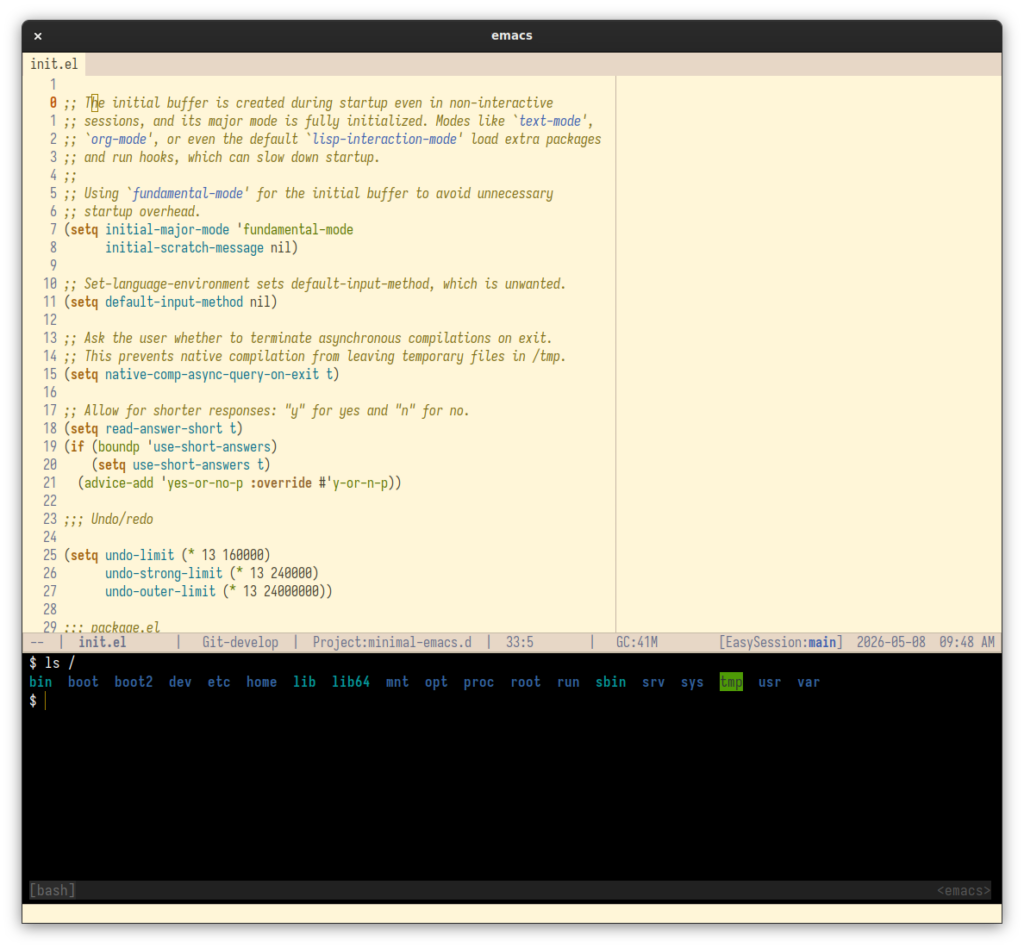
Why use shell-pop?
Adding shell-pop to your workflow offers the following benefits:
- Your terminal session remains active in the background, retaining your command history and running processes.
- It can automatically change the terminal directory to match the file or project you are currently visiting in Emacs.
- Toggling the shell does not ruin your carefully arranged window splits. (Especially when
shell-pop-full-spanis set to set to t) - It supports a wide variety of terminal emulators (term, eshell, ansi-term, vterm, and eat).
- It provides control over the terminal window layout, allowing you to specify its exact size as a percentage, define its position (top, bottom, left, right, or full screen), and choose whether it should span the entire width of the frame.
- It handles cleanup gracefully by automatically killing the terminal buffer and safely deleting its window when the underlying shell process exits.
- It includes a comprehensive set of lifecycle hooks (for opening, closing, and exiting), allowing you to trigger custom Emacs Lisp functions automatically based on the terminal state.
Installation and configuration
To install shell-pop from MELPA:
- If you haven't already done so, add MELPA repository to your Emacs configuration.
- Add the following code to your Emacs init file to install shell-pop from MELPA:
(use-package shell-pop
  ;; :bind automatically sets up the keybinding AND tells Emacs to lazy-load the
  ;; package the moment the key is pressed.
  :bind (("C-c t" . shell-pop))
  :custom
  ;; The key sequence used to toggle the shell window.
  (shell-pop-universal-key "C-c t")

  ;; Sets the screen position where the shell popup appears.
  ;; You can choose "bottom", "top", "right", "left", or "full".
  (shell-pop-window-position "bottom")

  ;; If non-nil, the window stretches across the entire frame width.
  (shell-pop-full-span nil)

  ;; The path to the shell executable used by the terminal emulator
  ;; (e.g., "/usr/bin/env bash").
  (shell-pop-term-shell shell-file-name)

  ;; The height or width of the window as a percentage of the frame.
  (shell-pop-window-size 30)

  ;; Setting this to non-nil sends commands to the shell. This is not always
  ;; desirable, as it can send commands to any prompt.
  (shell-pop-autocd-to-working-dir nil))
Configuring the terminal
Here are the exact configurations for the most popular Emacs shells. Simply copy and paste your preferred option into your init file:
ansi-term
(with-eval-after-load 'shell-pop
  (setopt shell-pop-shell-type '("ansi-term" "*ansi-term*"
                                 (lambda ()
                                   (ansi-term shell-pop-term-shell)))))
term
(with-eval-after-load 'shell-pop
  (setopt shell-pop-shell-type '("terminal" "*terminal*"
                                 (lambda ()
                                   (term shell-pop-term-shell)))))
vterm
Note: Requires the vterm package to be installed.
(with-eval-after-load 'shell-pop
  (setopt shell-pop-shell-type '("vterm" "*vterm*"
                                 (lambda ()
                                   (when (fboundp 'vterm)
                                     (let ((vterm-shell shell-pop-term-shell))
                                       (vterm)))))))
eat
Note: Requires the eat package to be installed.
(with-eval-after-load 'shell-pop
  (setopt shell-pop-shell-type '("eat" "*eat*"
                                 (lambda ()
                                   (when (fboundp 'eat)
                                     (eat shell-pop-term-shell))))))
Enhancements that I implemented as co-maintainer
If you are a long-time shell-pop user, here are the changes I recently made to the package. I encourage you to try the latest version and send Kazuo Yagi and me your feedback in the issue tracker:
- I added support for the vterm and eat terminals, two highly requested modern terminal emulators. This includes implementing automatic directory synchronization to ensure the shell always matches the current working directory in Emacs.
- Previously, the package relied on global variables and buffer deletion to manage window states. This caused unpredictable behavior when using complex layouts, multiple frames, or tabs. I refactored shell-pop to isolate state tracking by attaching it directly to Emacs window parameters.
- I resolved issues related to zombie buffers and asynchronous window hijacking. The code now stores buffer objects instead of names, scopes process sentinels strictly to the shell window, and correctly verifies buffer lifespans before attempting restoration.
- The toggle functionality now correctly recognizes active shell windows even when the cursor is focused elsewhere in the frame, preventing redundant terminal pop-ups.
- I fixed a directory desync bug by unconditionally enforcing auto cd. Emacs will no longer lose track of the shell's actual working directory if a user manually changes directories inside the terminal.
- The teardown routines were adjusted to ensure native terminal cleanup processes, such as writing Eshell history, execute fully before the buffer is destroyed.
- I replaced the simulated Ctrl-L keystroke with an explicit clear command to prevent literal ^L characters from printing in the terminal input buffer.
- The hard dependency on the term package is now optional. Users who prefer vterm, eat, standard shells or Eshell are no longer forced to load unnecessary terminal packages on startup.
Conclusion
Taking on a maintenance role for a tool I use daily has been an interesting experience. These recent updates aim to make shell-pop more reliable and modern. I encourage you to try the latest version and send us your feedback.
Thank you for posting this, and for maintaining it. I don't know if I saw it first on planet.emacslife.com or the Reddit emacs sub-reddit. It solves my problem with getting a pop-up terminal on the Linux Sway tiling desktop, which uses Wayland. People say you can make a terminal like xfce4-terminal behave like a pop-up, but I spent a couple hours one Saturday trying to figure out how and failed.
I am not looking for the other solution, which is why I didn't post a reply on reddit - I was afraid someone would think I was and take the thread in a different direction.
I also like how it picks up all my bash history, tab-completion, etc. I used this setting from your suggestions, which I suspect is what does that.
(shell-pop-term-shell "/usr/bin/env bash")
I tried a few other ways mentioned on the thread and some picked up bash settings and some didn't. And some toggled the terminal, some didn't, etc. This one does exactly what I expected.
My pleasure, Ed! Thank you for sharing your experience. You are right about the configuration line you used:
This tells the shell-pop to run Bash when the package launches the terminal emulator.
If anyone is interested in an alternative approach using tmux, my personal configuration is set to launch a tmux session:
This allows me to maintain multiple windows within the shell-pop terminal.
(The above alternative configuration requires the tmux-session script. I also use the .tmux.conf configuration .)
Please feel free to post a comment here or open a GitHub issue if you have any suggestions for improvement or encounter any problems.