I spend a significant portion of my professional life at a desk. Because of this, an optimized workstation isn’t just a luxury for me, it’s an absolute necessity. I’ve spent time designing a workspace that balances ergonomics, efficiency, and versatility.
I’m sharing my setup here because I’ve always found it valuable to see how other IT specialists configure their spaces, gain a little inspiration, and exchange ideas. I’d love to hear about your own workstation in the comments!
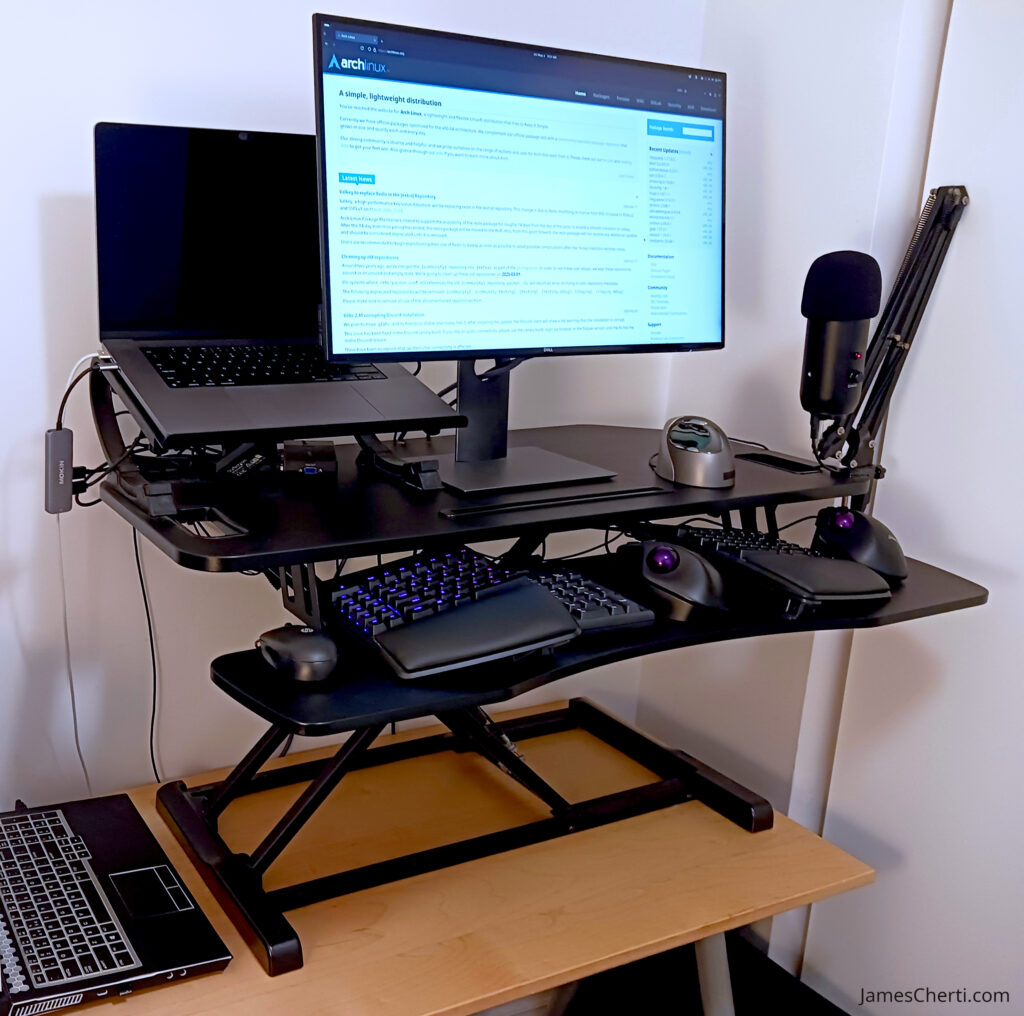
Here is a breakdown of the gear I use to support sustained focus, comfort, and productivity.
Sit-stand desk converter
The anchor of my setup is a sit-stand desk converter. Being able to transition between sitting and standing helps prevent the usual stiffness and aches that come with desk work, and I find that standing up intermittently naturally boosts my alertness. This is important when I need to lock in during heavy coding sessions or late-day system monitoring.
Split ergonomic keyboard
To protect my wrists, I use a mechanical split keyboard equipped with Cherry MX Blue switches. The tactile feedback is fantastic for heavy typing, and the split, tented design, paired with wrist rests, keeps my arms in a natural, relaxed position. It significantly cuts down on the muscular fatigue that usually sets in after a few hours.
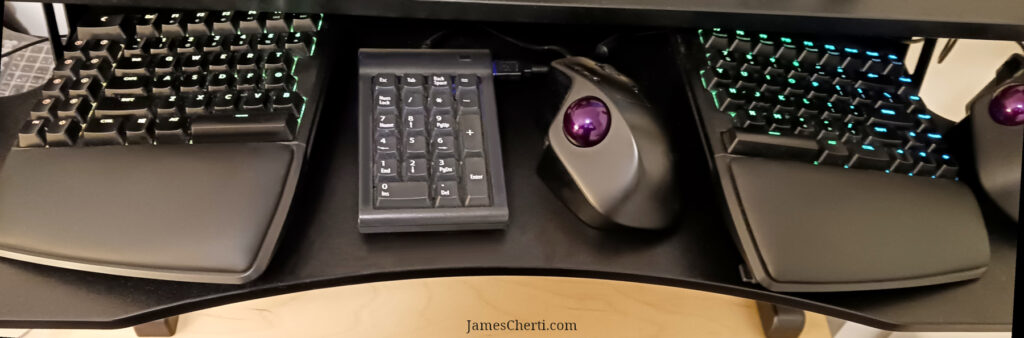
A quick layout tip: I actually position my mouse and keypad right in the middle between the keyboard halves. It’s much easier to reach than having them off to the far right, keeping my hands centered and minimizing strain.
Vertical and trackball mice
I currently use four distinct mice on my desk. While it sounds like overkill, it’s a deliberate strategy to accommodate different workflows and prevent repetitive strain injuries.
My primary go-to devices are a vertical mouse and a trackball. The vertical mouse keeps my arm in a natural handshake position, taking the twisting stress off my forearm. The trackball, on the other hand, lets me navigate using just my fingers, giving my wrist a complete break. Switching between these input methods throughout the week does an excellent job of distributing the physical workload.
External microphone with boom arm
Clear audio is non-negotiable for virtual meetings and the occasional recordings I produce. I use an external cardioid microphone mounted on a boom arm. The arm is great because it keeps the mic off my desk, freeing up valuable real estate. It also allows me to pull the mic right up to mouth level, which captures crisp audio while rejecting background noise.
Two computers
My daily workflow is divided across two distinct machines:
- Professional: Dedicated strictly to work responsibilities, focusing on secure infrastructure management and corporate development.
- Personal: My sandbox for personal projects, open-source contributions, and experimenting with new software configurations without risking my work environment.
Second curved monitor
Off to the left (though not visible in the picture), I run a second, curved monitor. I dedicate this screen primarily to multimedia and secondary apps. Offloading these to a separate screen keeps my main display uncluttered, allowing for uninterrupted focus on development and administration tasks. The curve of the monitor actually makes a noticeable difference, creating a more immersive feel and reducing eye strain when I’m glancing back and forth between displays.
Conclusion
Building this workstation has been an ongoing process of finding exactly what works best for my body and my daily tasks. Every piece was chosen with a specific purpose: to minimize physical strain while keeping me productive. If you spend your days tackling cognitively demanding tasks, investing in a setup that harmonizes comfort and operational efficiency is one of the best things you can do for your focus and long-term well-being.